
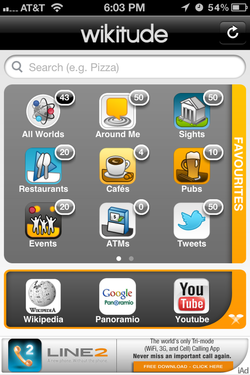
 Home View Screenshot Home View Screenshot I know. You're probably rolling your eyes right now thinking, "What has Caroline found now?" And that is such a great question! I have found a really cool app that's fun to use and can be helpful in genealogy and family history research. And? It has a 'tude. You know, attitude? Wikitude is an augmented reality browser, and what does that mean? Another good question. Here's how it's described in the Apple App Store: "Wikitude World Browser is a fun, innovative and informative augmented reality (AR) platform allowing you to discover what’s around you in a completely new way. By using the camera, simply hold up your smartphone and explore your surroundings. Wikitude will overlay the camera’s display and the objects you look at with additional interactive content and information - really cool!" So now you're probably thinking how in the world is this going to help you in your research, right? Well, when you first go into the Wikitude app it will request to know your location, which is key to operating this wonderful little app. Then the home screen, pictured above, features a search box, and a menu of icons that continues to the second page [which you can access by swiping your finger across the screen from right to left]. The menu of icons consists of the following:
Now if you'll closely take a look at the view in this screenshot, there are few more icons across the top of the screen and from left to right here is what they are and what they do:
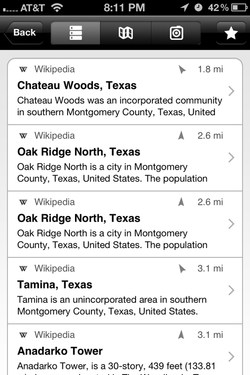 List View Screenshot List View Screenshot So, how can this be applied to genealogy and family history research? Well, if you go back to the Home screen, you can enter keywords into the search box to look for certain types of locales. For example, I searched for the word 'cemetery'. [The light bulb just turned on, didn't it?] Pictured to the right is the screenshot of the List View of all locations found either in a City Search or a Wikipedia listing that are near me, and it gives the distance they are from me. When you select a locale, it will take you to its City Search or Wikipedia entry for more information. [Cool, huh?] 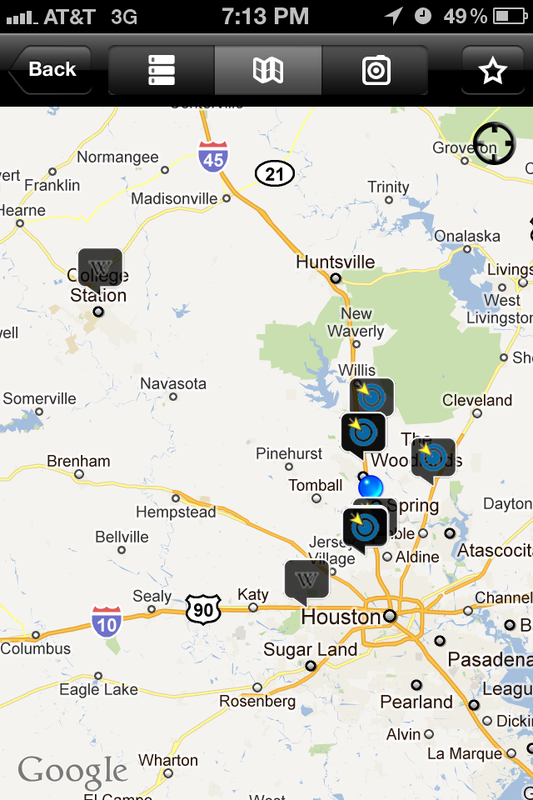 Map View Screenshot Map View Screenshot Pictured to the left is the screenshot of the same 'cemetery' search in Map View. You can zoom and select a location, and the name of the cemetery and its distance from you will pop up with a link that will give its City Search or Wikipedia listing. 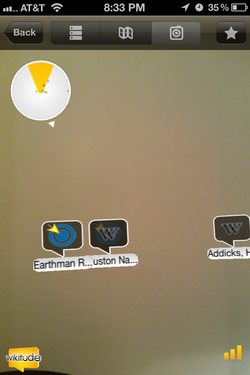 Camera View Screenshot Camera View Screenshot Selecting the Camera View will give you a view 'through the view finder' as if you were going to take a picture with the interactive overlay as well as a compass of sorts that indicates locales with a gray dot. The screenshot of that view is pictured to the left, and it was taken from inside my office. The view shows you that in the direction I was holding my iPhone, there are 3 cemeteries that are nearby. Each icon shows whether it has a City Search entry or a Wikipedia entry. You can then click on the icon for the listing. The second one from the left is Houston National Cemetery where my Great-Aunt Anne and her husband are buried. Also, in the Camera View, you can adjust the distance that you want the app to look for locales up to 65.6 miles from you by pressing down on the compass icon in the top left hand corner. Obviously, if a nearby cemetery does not have a web listing, it will not show up while using the app. However, this is a wonderful app for those who are out tombstone hunting in an unfamiliar area, and are in need of directional assistance.
Other search terms I used were 'library', 'genealogy', 'archive', and 'history'. All of them came back with positive results including local genealogical societies as well as local history spots.The Wikitude app is available for the iPhone and the iPad and it's FREE. [If I had an iPad, I could have given you screenshots from it. Hint. Hint. Santa.] It's also available for the Android [Thanks to Linda McCauley for pointing that out.] and it's also preinstalled on the Porsche P‘9981 BlackBerry Smartphone. [Not the car.] Now can't you see why they called this app 'Wikitude'? It really is a wiki with an attitude. In fact, I'd go so far as to call it a wiki on steroids, a Wikiroid. Wouldn't you? Let me know what you think about this app in comments below. Is this app something that you could use in your research? Are there any other search terms or ways to use it that I didn't list up above? And That's an App Thursday, ~Caroline
1 Comment
11/5/2011 03:30:00 am
OK, this is it - I'm going to have to STOP READING YOUR BLOG!! Why, you ask? Because you always have so many cool ideas and things I should be doing/need to try/never thought of before. I am just getting farther and father behind AND my genea-room is NOT getting organized. I'm blaming you ;-) Leave a Reply. |

|
© Copyright For Your Family Story 2016 - All Rights Reserved
|