Picture
I will not be going to the FGS (Federation of Genealogical Societies) Conference this year in Birmingham, Alabama. However, I know a lot of you are going. Therefore, I decided to share with you some apps on my iPhone that I tend to use while I'm at a conference and briefly explain what I use them for. {And I included some alternates for you  just in case you'd like an alternate. Like, I use OneNote, but you probably use Evernote.}

That's right. Gen-Tech Links has a theme today. {And a bonus at the end.}
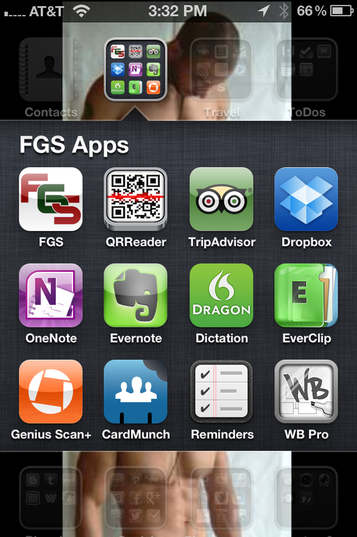
  • FGS App - The FGS App for the 2012 conference isn't out yet, but should be soon. Last year it included links to many conference-related sites, but most importantly it had a link for Conference Activities and the Conference Program. So keep your eyes peeled out for its debut. I don't know if it'll be similar or on a different platform, but regardless you'll want it on your mobile device for the conference.  
  • QRReader App ~ Some of the vendors will have QR codes on their booths and/or on their booth literature. So? Already have this app downloaded and on your mobile device so you can scan within the app and then your device's browser will open and send you to wherever the vendor wanted to send you to. Hopefully, this is their website because that would make good business sense, no? Then you'll want to bookmark it or add it to your reading list. So later when you're winding down after dinner with a glass of wine or when you're at the airport after the conference waiting on that delayed plane, you can peruse your bookmarks or reading list of those vendors' websites.
Picture
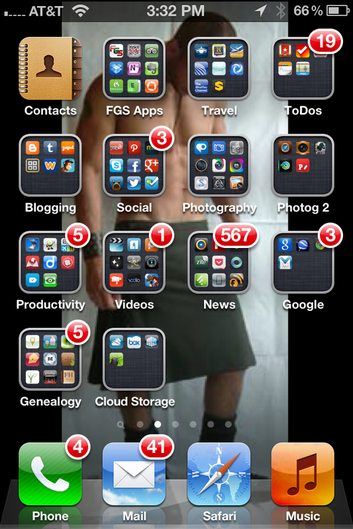
Screenshot of suggested conference apps. {Don't worry. He's wearing a kilt. I promise.}
Picture
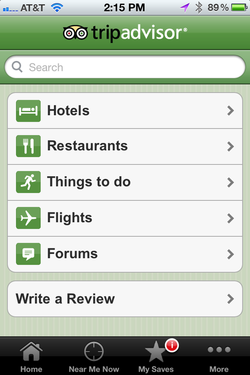
Screenshot of the TripAdvisor App.
  • TripAdvisor App ~ Where are we going to eat tonight? That's *always* a popular question at conferences. {Well, if you and your genea-buds like to go off-grid for dinner. Like mine do.} Or if you brought your non-genealogy-loving family with you so they can have some fun in or around Birmingham, this app is handy dandy for finding places to eat and things to do where you are. I personally use this app endlessly when I'm traveling on family vacations. Check it out.  
  • Dropbox App ~ I use Dropbox. {Along with a lot of other cloud storage services because I'm equal opportunity like that.} So, if you've got things you need to access from there while conferencing or if you need to put some stuff in the cloud, you'll want your fave cloud storage app right where you can find it. In your hand.
  • OneNote App ~ I'm a OneNote kinda girl. It's where I store my notes. So if you're a OneNote user make sure you have the app on your smartphone.
  • Evernote App ~ Many of y'all prefer to handle your note-taking needs in Evernote. Make sure you have this app right where you can find it. In your hand.
  • EverClip App ~ So. Let's say you navigate to a website on your mobile device during a lecture because the lecturer is talking about it and you wanna see it. Well, instead of bookmarking it or adding it to your reading list, maybe you'd rather have it in your Evernote because that's where you've been taking notes for the lecture. Then, use this app to clip it to your Evernote.

  • Dragon Dictation App ~ Need to make a quick note between lectures? Dictate the note here and then copy and paste it to your fave note-taking app if you want or email {or text} it to yourself. {You can also tweet or facebook the note as a link.}
  • Genius Scan + App ~ So. You've been in the vendor hall and picked up a bunch of literature, didn't you? {You can admit it. We're all friends here.} But? Who wants all that paper? {Not me.} Use this app to scan it and send it to a plethora of other places or apps.
  • CardMunch App ~ Even though there are more techie ways to give other people our information, the paper business card is still alive and doing very well, thank you very much. So. Scan those suckers into this app. LinkedIn bought it back in January. {I think.} The app reads the info and will convert the card into a contact and if they have a LinkedIn profile it links to it. Like magic. {I love magic.} 
  • Reminders App ~ This is a native app to the iOS 5 on my iPhone. To say I use it a lot is an understatement. It's easy and intuitive. Did I mention it's easy? {I love easy almost as much as I love magic.} But? Use the to-do app that works for you. 
  • Whiteboard Capture Pro App ~ In the unconferencing sessions, sometimes there's a whiteboard. And sometimes it's used. I am lazy. You can bet I'm snapping a quick pic of whatever gets written up there and dealing with it later over a glass of wine.
  • TweetBot App ~ This is my Twitter App of choice. {Although with how Twitter is tightening the reigns on its service, I don't know if I'll be able to continue to use it.} No matter the Twitter app you prefer to use at this moment in time, please use it. It helps to pump up the conference and excite people about genealogy in general. {And it's helpful to find fellow conference goers when it's time for dinner. And allows those not attending to live vicariously through you.} I think their official hashtag is #FGS2012, but I'm sure if that's incorrect you {Read: Many of you} will be happy to correct me on that. Anywho, use the hashtag so that people {who aren't as lazy as I am} can collect all the tweets with that hashtag together in a post so we can read it at the end of the day over a glass of wine.
  • Facebook App ~ Don't forget to update your Facebook status throughout the day. You know, to make everyone jealous and to promote genealogy in general to all your FB friends. {And don't forget the pics, please. Remember: We are living vicariously through you. And we can't do that effectively without images. Lots of them.}
  • Google+ App ~ If this is your social network of choice, then make sure you have it handy on your mobile device. And then use it. Please. Why? See the Tweetbot and Facebook App explanations above.
  • FourSquare App ~ If you're already a user of this service/app, then don't forget to use it at the conference. Although, I doubt very seriously the conference will set it up and be using it marketing-wise {which is a shame, really}, still use it. You know you want to be Number 1 on your leaderboard, and this is your opportunity to rock that 1st place spot and achieve badges, mayorships, and such. Additionally, if you haven't guessed it by now, when you go to a conference, you are an ambassador, of sorts, for the conference through your social media networks. To those of us who love genealogy, we love to follow you and your conference experience. And for those who aren't into genealogy, you're promoting it to them in a fun and non-pushy way. {And you're driving them nuts in Foursquare because you're gaining points and beating them.}
Picture
Screenshot of folders with conference-related apps. {And see? I told you he was wearing a kilt.}
  • LinkedIn App ~ This one just makes sense. If you're on LinkedIn and I already know most of the vendors and genealogists are, then make sure you have the app ready. You never know when this might come in handy.
  • Google Search App ~ "What is..." I dunno. *shrugs* Have you googled it? If you don't already have this app then get it and find out what *it* is.
  • Camera App ~ This is a native app to the iPhone. I usually take all my pics, videos, and scans through it first then run the pics/scans/videos through my various {Read: plethora of} photo editing, scanning, and video apps. Why? Because that's my workflow. No special reason.
  • Instagram App ~ Now. I know I pose for a lot of pics at conferences, and I'm blind most of the time from the flash. {O-o} But? I never, ever see these pics online anywhere. Oh sure. A few pop up on Facebook, but not nearly as many as I posed for. And I think I know why. People forget to *do* anything with them. And? It's 2012, folks. Just stop that. If you want, don't take the photo in the camera app. Take it in Instagram, slap a filter on it, and share it on Instagram. {And don't forget to tag it with the official hashtag #FGS2012.} This has got to be the *easiest* social networking and promoting you will ever, ever do. I promise. Easiest in terms of use and also in terms of engagement. People like pics. And? I've found most of them aren't genealogists. They're people who enjoy a good pic and filter. So download this app, sign up, and start Instagramming. And if you need a follower on there, look me up: @familystories.

Bonus
Sugarsync is another cloud-based storage service that offers 5GB of free storage, and they have an app for just about every mobile device. Right now they're offering up to 32GB of free storage to those who share the app with others. So, I thought I'd pass this on to y'all. {Cuz duh. Free 32GB of storage.} If you sign up for a free Sugarsync account, you get 5GB of free storage and I can earn up to 32GB. Not a bad deal, eh? Here's the referral link if you're interested: https://www.sugarsync.com/referral?rf=b4jybeibj6089&utm_source=website&utm_medium=web&utm_campaign=referral&shareEvent=1546818

So. What apps, if any, do you plan to use at FGS 2012? Share the wealth of your knowledge  with everyone in comments below. 

Happy Researching!
~Caroline


Comments

08/17/2012 6:07pm

I was going to joke and state that this was not an exhaustive list, but that would be a huge lie. This is a terrific post and quite honestly, anyone with an iPhone could use these tips for a lot of areas, not just at conferences. Well done (except for the kilt guy - not my type)

Reply
Caroline M. Pointer
08/17/2012 7:44pm

Thanks, Kenneth! Hard to believe, but these aren't all the ones one could use at a conference. I have more. And? They certainly aren't all the ones I use on a daily, weekly, or monthly basis either for genealogical researching purposes.

I figured I had to stop somewhere. LOL.

And thank you so much for the compliment and for stopping by and reading. I appreciate it. =)

~C

Reply
08/17/2012 10:35pm

Great suggestions! And I like the guy in the kilt.

Reply
Caroline M. Pointer
08/20/2012 9:26am

Thanks Cathi! And? It warms my heart that you like the guy in the kilt. LOL.

Thanks for stopping by and reading! =)

~C

Reply


Leave a Reply