4YourFamilyStory.com
  • Home
  • Blog
  • Services
  • Resources
    • Research Resources
    • Getting Started with Genealogy
    • Organize Your Genealogy with Onenote
    • Organize Your Genealogy With Evernote
    • How do I make a Family History Site with Weebly.com?
    • How do I make screenshots & annotations?
    • Texas Genealogy
  • About
    • Welcome!
    • Where Else I Can Be Found Online
    • Disclosure
    • Privacy Policy
    • Terms of Service
  • Connect
  • Home
  • Blog
  • Services
  • Resources
    • Research Resources
    • Getting Started with Genealogy
    • Organize Your Genealogy with Onenote
    • Organize Your Genealogy With Evernote
    • How do I make a Family History Site with Weebly.com?
    • How do I make screenshots & annotations?
    • Texas Genealogy
  • About
    • Welcome!
    • Where Else I Can Be Found Online
    • Disclosure
    • Privacy Policy
    • Terms of Service
  • Connect

Find your family story.

Genealogy - Technology Links for 14 Aug 2012

8/14/2012

2 Comments

 
Genealogy Technology Links for 14 Aug 2012© Copyright 2012 Caroline M. Pointer
Gen-Tech Links for Tuesday, 14 Aug 2012

Today has been a very busy day personally. Funny how life and living family members, um, interrupt your plans to research and write about, um, non-living family members. {Can I get an amen?}

Despite the major interruption to my entire morning, I managed to find a whole new list of blog post links to technology that might be able to help you in your research of your non-living family members. {That is, when the living members are quite done with their drama for the day...}

Anywho, here is the list:

  • Maniana To Do List Task List Android App Review by AndroidTapp.com by Paul Wilks on androidtapp.com ~ I know. Another to-do listing app. What can I say? We all have many things to do and apparently we need lots of help to remember what it is exactly we need to do. Unlike some of the others I've mentioned previously, this one is for the Android folks, and it seems to be a pretty simple list maker similar to the Clear app {which I reviewed previously}, and it looks pretty. Or at least I think so. I mean, that *is* important, right? LOL. This app seems perfect for making those quick to-do lists on the fly. You know like when you need to add to the top of your to-do list, "Help family member with their drama all morning long." Yeah. So, check it out. =)
  • Manage That Big Bunch Of Physical Books By Winning A Copy Of BookBuddy For iPhone by Casey Tschida on appadvice.com ~ Okay. I've noticed lately a few people in the gen world have been talking about their libraries. {These are probably folks who are in the ProGen class 'cause there's a whole lesson in taking inventory of your gen books. At least, this would be my educated guess. I could be wrong.} So. When I saw this app today being reviewed, I thought it was *way* cool, and you might be interested. I've downloaded the free version onto my iPhone, and I'm going to take it for a spin. Definitely an app worth looking at when we have all those *heavy* genealgoy reference books on the shelves, and this app can make cataloging them and keeping up with that sizable library a lot easier. {And who doesn't love easier?}
  • 360 Panoramic for iPad and iPhone Review by Michael Baturin on everythingicafe.com ~ Maybe you're lucky enough to be able to walk through an historic house your ancestors lived in. Wouldn't it be cool to be able to take a panoramic picture of the rooms in that house? Well, this app review that Michael writes makes the 360 Panoramic app seem likes it capable of doing the job very well and very easily. I included the video below, but also take a look at his written review that also includes screenshots.

  • WebDisk Provides The Easiest Way To Share Files Between iPhone & Desktop by Hamza on addictivetips.com ~ I can't tell you, exactly, why I don't like using The iTunes for sharing files. I just don't. So when I saw this review, I thought to myself, "How handy handy!" You can use WebDisk to share files between your iOS device and your desktop or laptop computer without ever having to launch The iTunes. So read these instructions on how to do it. I know I can't wait to try this!
  • 10 ways to help improve your Android battery life by Mapesy on community.sprint.com ~ I don't have an Android phone {I did root my Nook Tablet to make it an Android device however.} and whenever I do app reviews, their done using my iPhone. But? Just to show my readers with Android devices that I do really and truly appreciate y'all here's a list of 10 ways to get a little more juice out of your batteries.
  • Google Updates New Orleans Street View Imagery by Matt McGee on searchengineland.com ~ If you do New Orleans research, you might want to take a look at the Google updates for its street views for maps. The images of the damage that was left in the wake of Katrina have finally been replaced, and NOLA is looking a lot better. Check it out.
  • Google beefs up patent search library with European patents by Rachel King on zdnet.com ~ This might be helpful for all you researchers. By now, many of us have heard of that handy {and, indeed, dandy} research tip to take a look at Google Patents for glimpses of our American ancestors. As of today, though, European patents have been added. Ready, set, go...{Wait! Read the rest of my list first. Then goooo.}
  • Google Now pushes itinerary and travel notifications, and Google Translate translates text in photos by Sean O'neill on tnooz.com ~ I think the title kinda says it all, no? If not, then how about this: Google Translate can now translate text in photos. {Um, yeah.} Of course, this isn't written text, but still...if you're a traveling genealogist in a place where you're not exactly fluent in that country's language, well, The Google Now is looking pretty good, oui?
  • How Can I Migrate My Google Data from One Account to Another? by Adam Dachis on Lifehacker.com ~ Are your multiple Google accounts giving you the Sybil blues? Would you like to combine all of your Google Lives together? Look no further. Adam's got this for you. 
  • Everyday.me Is a Journaling App for iPhone That Writes Itself by Melanie Pinola on Lifehacker.com ~ This looks cool. And easy. {Love easy.} I think I could actually update my everyday-stuff-in-a-journal-just-for-my-eyes-like-when-a-family-member-draws-me-into-their-drama in a journal that's this easy to use. I think my descendants would like to read about that kind of stuff about me. Just from my viewpoint. {I *know* I'd love to read stuff like that about my ancestors. Or yours. I'm not picky.}  I'm gonna try it. Who else is in on this one?


Okay. That's it for today, folks. Hope you find something here that can help you out with your genealogy and family history research in some way. =)

Happy Researching!

~Caroline
2 Comments
Genealogy - Technology Links for 13 Aug 2012

8/13/2012

2 Comments

 
Picture© Copyright 2012 Caroline M. Pointer
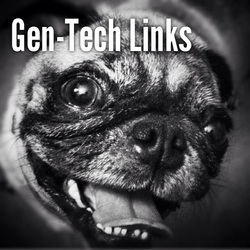
We had a blast on vacation, but it's good to be home where our Pug, Millie, {pictured on the left} and our cat, Peanut, {pictured on Instagram today if you follow me there: @FamilyStories} waited patiently for us to come home.

While I'm playing "catch up" I did manage to find some genealogy-technology links to share with you. So let's get started!


  • 5 Excellent Productivity Tools for Remote Workers by Stephanie Buck on mashable.com ~ Do you work remotely from home? Here is a list of apps that you might find helpful to increase your productivity. {'Cause we all know it's hard to stay on track and be productive while working from home as opposed to working in an office.}
  • The Stupid Things You Do in the Name of Productivity (and How to Fix Them) by Adam Dachis on lifehacker.com ~ Okay. I'm willing to admit to doing this. Now, can you admit it? I always start researching in my tree on a person then I can be persuaded rather quickly to jump to another instead of systematically working my program on the original person I was focusing on to begin with. Temptation. That's what those leaves are. Temptation. It's hard to make changes, but I'm willing to try. And that's half the battle. 
  • Mobi-Lens: A Handy But Ugly iPhone Photography Accessory by Dom Esposito at appadvice.com ~ I agree. The Mobi-Lens prototype isn't pretty, but goodness, it's beautifully brilliant! Mobi-Lens is an ingenious invention, and I just love the video the brother-sister duo, the co-inventors, made about it. The Mobi-Lens is in Kickstarter mode where they are quickly getting the funds needed to bring their invention to, well, everyone. Can you see the uses for the genealogy and family history researcher who is on-the-go? In a cemetery? Or at an ancestral homesite? And in need of a wide-lens? Yeah. Check out their video and the blog post by Dom and see what I mean! 
  • Browser Wars: Chrome vs. IE9 vs. Firefox by Michael Muchmore on PCmag.com ~ Everyone has their favorite for whatever reason, but I have made an observation of sorts of folks and their browsers. They get very adamant about the use of one over another, and I think that can be a big mistake since the developers are *always* upgrading and making improvements. Therefore, it's always a good idea, in my opinion, to remain open-minded about browsers. I think each browser brings something to the researching table, so to speak. So. With that piece of advice, read what Michael has to say in his blog post comparing the browsers. =)
  • It’s A Dark Time To Be A Consumer In The Cloud by Klint Finley on techcrunch.com ~ I don't mean to add to your paranoia about cloud storage and usage, but here's a blog post that will make you think twice before storing stuff in the cloud. I mean, I like the cloud idea and all, but what are you really doing? And what are the long term ramifications of what you are in doing in the cloud? You should ~at the very least~ be informed. You know, just your usual stuff for a Monday. ;)
  • Expand Your Budget to Afford Nice Things, Like the Nexus 7 by Janet Cloninger on the-gadgeteer.com ~ There was an online discussion yesterday started by a friend of mine about needing to buy an affordable tablet. So, when I saw this blog post today, I thought it'd be helpful to her and to everyone. 'Cause who here isn't on some kind of budget? {That's what I thought.} We like the new and shiny stuff. We just lack the green stuff to obtain the new and shiny stuff. Am I right, or am I right? So, read Janet's post where she gives us some ideas on how to afford the new and shiny stuff.
  • Wrap Headphones Inside an Old Tape Dispenser for Tangle-Free Storage by Thorin Klosowski on lifehacker.com ~ Speaking of budgets and new and shiny things, maybe we don't new new and shiny. And maybe having a tight budgets just makes us more clever. I dunno. What I *do* know is this tip is pretty darn clever. Sometimes clever is just that. Clever. Wrap your head around that. *snort*
  • iPhone 5: Why I Won’t Be Buying You by Ardjuna Seghers on trustedreviews.com ~ Oh, look! It's new! It's shiny! It's made by Apple! It's *so* iCool!!!! Yeah. If this is how you buy tech, please don't tell me. Okay? Ardjuna {who, BTW is NOT an Apple hater} makes some good points on why buying the iPhone 5 is just not a good idea. I happen to concur. Do you? {And? do you think our ancestors would have ever guessed we'd be thinking so much about our budgets to allow us to purchase things and services to be able to hunt them and their stories and secrets down? O-o }
  • Dictation Is a Free, Easy-to-Use Speech-to-Text App for Chrome by Thorin Klosowski on lifehacker.com ~ Dictation apps have been talked about recently online in relation to genealogy and family history research so this blog post caught my eye. It's a web-based app for the Chrome browser. Check it out and see if you could or would use it in your research workflow. I think it has some good possibilities. What say you? And? It's *free*. So you're just investing your time in a product that may just actually make you more productive while researching. Don't you think your research is worth that kind of an investment?

That's it for today, folks! Millie is barking at me for some attention. And I'm working on getting caught up and getting the newsletters out. Good thing I had so much rest the previous week, eh? So look for the Genea-Tech newsletter in your inbox tomorrow morning and look for another Gen-Tech Links post here tomorrow afternoon!

~Caroline
2 Comments

Genealogy - Technology Links for 10 Aug 2012

8/10/2012

0 Comments

 
Picture© Copyright 2012 Caroline M. Pointer
Okay. Here are today's Genealogy - Technology Links for this Friday, 10 Aug 2012. I may have tweeted some of them, but then again maybe not. {Follow me on Twitter: @FamilyStories }No matter because I've picked the best here in this curated-just-for-you list of tech-related posts that I think have some kind of value in the genealogy and family history research world.

  • PhoneClean: iPhone Cleaner by Masshal Saif on geekchunk.com ~ I SO need to do this! Yes, I'm one of the goobers who bought a 16GB iPhone, and I'm quickly running out of room for all these fun apps. LOL. Read on to learn how to clean off your idevice.
  • Doit.im Brings Powerful Yet Intuitive GTD Management to The Web and Mobile Devices by Melanie Panola on lifehacker.com ~ I told y'all yesterday that I'm addicted to productivity apps, and I wasn't kidding. Here's another ~ Doit.im. It's been around a while, but they've upgraded it making it pretty robust. So, check it out.
  • Desktop Arsenal: 10 Tools We Can't Live Without by Jocelyn K. Glei on 99u.com ~ I use some of these. Now? I'm going to have to try the rest. Which ones do you use?
  • The simplest productivity feature in Evernote I didn’t know by Christopher S. Penn on christopherspenn.com ~ Now. I was kind of proud that I already knew this one. In fact, I use it when I'm sharing a genealogy check-off form that I've created in OneNote for y'all. {You know, those free forms *some* people think I shouldn't give away for free? Yeah. Those.} Anywho, if you didn't know how to do this, then after you read this post, you will.
  • CEO Friday: Why we made some recent mobile changes by David Barrett on blog.Expensify.com ~ I've been using the Expensify app for a while now and I've suggested it to a few folks. It's great for genealogy professionals who need to keep careful track of expenses. And? Now they've made some updates to their app. So check out their site, their app, and their newest update if you're a genealogy professional who needs a clean interface to keep up with their expenses.
  • St. Louis couple launches genealogy app for iPhone by Greta Weiderman on bizjournals.com ~ This free app allows you to save private audio recordings told by family members and then upload them to their site. With a freemium based platform, they have a plan to suit everyone's needs.
  • Get “REEL” About Your Home Movie Legacy Before It’s Too Late, Part I AND Get “REEL” About Your Home Movie Legacy: Fun Things to Do Your Movies, Part II by Rhonda Vigeant on appoblogs.com ~ Rhonda gives some excellent advice about preservation of home movies. Read both blog posts. You won't regret it.
  • Office Web Apps: First Take by Simon Bisson on zdnet.com ~ I might've already mentioned {Okay. I already did mention...} about how excited I am about the new MS Office and its imminent launch. Here's a blog post dedicated to their web apps and what they'll look like in their newer state. In one word? Awesome.


Okay, folks. That's it for today. I'm still on vacay, but look for the Genea-Tech Newsletter this weekend which will include ~among many other things~ some more Genealogy-Technology Links. 

Picked just for you. 

By me. 

A fellow researcher.

Who just happens to love playing with tech.

~Caroline
Sign up for the Genea-Tech Newsletter today: 
Genea-Tech Newsletter Sign Up
0 Comments

Genealogy - Technology Links 9 Aug 2012

8/9/2012

0 Comments

 
Picture
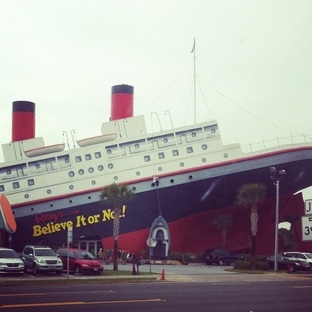
Today was a rainy day here on the beach, and Team Pointer went to the Ripley's Believe It or Not Museum and the 4D Movie Ride attraction. And lucky for you, I was in line for the 12 minute movie/ride thingy for an hour and a half and was able to find some interesting tech links for you that you might find helpful in your genealogy and family history pursuits.

So here they are...

  • iPad Productivity: How to get efficient with your iPad, Evernote and GTD - an eBook Review by Daniel Gold at dangoldesq.com ~ Yes, an e-book review, but? It's a great review on a book that could really get you organized and productive. I mean, with the combination of an iPad, Evernote and GTD, where could you go wrong?
  • 3 Productivity Benefits in the Microsoft OneNote 2013 Preview by Will Kelly on lifehack.com ~ Okay. I *love* OneNote. Adore it. And to say that I'm frothing at the mouth waiting for the latest MS Office and most especially, OneNote 2013, is an understatement. And in his post, Will, gives us a tasty preview of what to expect from it productivity-wise. Can you say better tables?
  • 10 Reasons Working From Home Might Not Be For You by Lindsay Olson on money.usanews.com ~ Thinking about transitioning into a professional genealogist or starting a genealogy-related business where you'll be working from home? Check this post out to see if you suit the working environment. 
  • Tips For Restoring From iCloud Backups by Thomas on isource.com ~ Needing to restore from an iCloud backup? Or? Be prepared for when you do by reading this blog post of great tips to get the job done.
  • Burner App Essentially Turns your iPhone into a Multi-line Disposable Phone by Andrew Grush on mobilemag.com ~ Needing to list your mobile phone number online, but don't really want to give it out? With the Burner app for the iPhone, you can create and use temporary numbers. {What will they think of next, right?}
  • A Tiny Keychain Tripod You’ll Always Have On Hand by Andrew Liszewski on gizmodo.com ~ This little gadget is handy dandy if you need to stabilize your iPhone4 when taking pics at the library or archives. And? It's cute as a button. {Which I'm sure that's just what you're worried about at the library or archives. Looking cute as a button.} Probably not going to be the perfect solution, but how many of you carry your iPhone tripod with you on your keychain? {That's what I thought.}
  • Pulse news reader launches for the web by Gene Ryan Briones on ubergizmo.com ~ Okay. I'm excited about this. The Pulse news reader is one of the apps I use to stay on top of all the news on my iPhone and my Nook Tablet, and I've been waiting patiently for the web version, and TA-DA! It's here. Finally. I've already played with it, and they have this short but nifty video about it. Go ahead. Take a look:
  • YouTube Video Editor Enhancements Just Got Faster, Easier & More Powerful by Megan O'neill on socialtimes.com ~ Y'all are making videos, right? No? Well, do you have a YouTube channel yet? If not get one. And then start making some videos. It's easy and fun. And? Many folks would rather watch a quick video than read a bunch of words. {Scandalous, I know, but true.} Break your routine and make a quick video. Your blog readers will thank you. And? If you blog for a genealogical society or have genealogy-related business, then you *need* to be on YouTube, like yesterday. Seriously. Anywho, here are some video editor enhancements YouTube has made. Haven't had a chance to try them out, but you can bet I will. Soon. {Subscribe to the 4yourfamilystory YouTube channel.}
  • Any.DO: Make Things Happen by Justin Stavarius on iphone.appstorm.net ~ Like Justin, this blog post author, I'm addicted to productivity apps. My Productivity Folder on my iPhone is, um, full. I dunno if I'm any more productive than if I didn't have them at all, but I like having them and using them. And Any.Do looks very, um, habit-forming. Check it out! And become productive. Or become a productivity app hoarder like me. ;)


Okay. That's it for today. Look for another Gen-Tech Link post tomorrow afternoon and another one in the Genea-Tech Newsletter this weekend. Now? Back to my vacay. =)

~Caroline
Sign up for the Genea-Tech Newsletter today:
Genea-Tech Newsletter Sign Up

Picture
Ripley's Believe It or Not! Museum, Panama City Beach, FL
Genealogy Technology Links
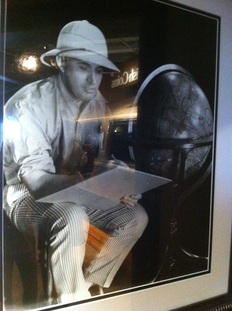
Robert L. Ripley
0 Comments

Genealogy - Technology Links  8 Aug 2012

8/8/2012

2 Comments

 
Genealogy Technology Links© Copyright 2012 Caroline M. Pointer
Okay. Even though I'm on vacation, I took some time out between boogie boarding and napping to find some links to posts about technology that a genealogist or family historian researcher, like you, might find interesting.

Or maybe you won't. *shrugs*

These weren't found by an algorithm. They're hand-picked ~ curated ~ just for you by me. A genealogist and family historian who likes to read [a lot] about and play [a lot] with tech.

So here's today's list:

  • The ins and outs of Instapaper by Victor Agreda on thenextweb.com ~ Are you using Instapaper to its fullest? Or are you even using Instapaper? Do you read *anything* on the internet? Then you need an app like Instapaper. In this post, Victor gives you a blow-by-blow of what it is and how to use it effectively. And? I highly recommend it. The post and the app.
  • Luxury Brands Are Going Where The Rich Kids Are: Instagram by Colleen Taylor on Techcrunch.com ~ I've always maintained that paying someone else to 'do your genealogy' is a luxury. I mean, seriously. It's not a necessity. Keeping that in mind, if you have a genealogy-related business, are you targeting the right potential clients or customers? Are you using the right social media platform to do this? Are you using Instagram in your marketing/brand awareness efforts? Colleen makes a great point in this post about who is using Instagram and why luxury brands are using it. [Yes, I know. Genealogy-related businesses are not luxury brands, but genealogy research can be a luxury and are you reaching those potential customers or clients who can actually afford your services? It's something to think about. To consider. To ponder. Or not.]
  • Evernote updates for iOS, adds tap anywhere to edit by Terrence O'brien on engadget.com ~ The Evernote app for iOS has added a much-needed feature to increase a user's workflow. Found out what and then download it or upgrade it. [After you finish reading my post, of course. =) ]
  • New: Gmail Results Embedded In Google Search Results by Barry Schwartz on searchengineland.com ~ When I read this at first, I was like, "Wha-?" Then I read the post, then I was like, "Aaaahhh." Might be helpful. Read for yourself and find out.
  • Google Knowledge Graph coming to all English-speaking nations tomorrow, adds lists to results by Terrence O'brien on engadget.com ~ Yeah. So. Speaking of The Google, have you checked out the new Google Knowledge Graph? Personally, I think it has the potential to *really* confuse a bunch of new researchers. What do you think?
  • Reverse Image Search Returns Nearly Identical Photo from 36 Years Ago by Ken Smith on petapixel.com ~ Okay. I don't care who you are. This is *really* cool. Has anyone tried this? Have you taken a picture of, I dunno, a view that maybe your ancestor would have had and reverse image searched it? Or have you taken an old family pic, scanned it, and reverse image searched it? Do you use it for research? [And none of these questions are rhetorical. Comments appreciated. =) ]
  • Family History Slideshows Made Easy from slideshowblog.com ~ Has anyone used this? Heard about it? Looks *way* cool. Really nice for family reunions and special occasions. They even have a video of what it can do. Yowzer. Check it out:

  • 3 Tips to Teach Technology to Older Generations by Barbara Jolie on gettingsmart.com ~ If you read yesterday's list of tech links, you already know this idea intrigues me. Greatly. I really think this is a *great* idea for genealogical societies. What do you think? Can we get younger people involved in GenSocs mentoring our more mature members in tech while our more mature members mentor our younger members in life, local history, and family history? Or is that just crazy thinking on my part? Does your GenSoc already have a program like this?
  • Harvest: Simple, Online Time Tracking by James Cull on web.appstorm.net ~ And for the genealogy professionals, here's a thorough review of a time tracking and invoicing web app. It's really worth a look.

And that's it for today. I've some waves out there with my name on them. See ya' tomorrow with more genealogy - technology links picked just for you by me [on a beach]. 

~Caroline
2 Comments

Genealogy Technology Links 7 Aug 2012

8/7/2012

2 Comments

 
Daily Genealogy Technology Links© Copyright 2012 Caroline M. Pointer
If you follow me on Twitter [@FamilyStories] or Facebook, you already know I post links to technology posts that I think might have some value to the genealogy world in some way whether the genealogist is a rookie genealogist [beginner], an I'm-getting-the-hang-of-this genealogist [intermediate], an I'm-owning-this-genealogy-thing-like-a-boss genealogist [advanced], or I'm-a-pro-at-genealogy genealogist [professional].

I've tried several ways to do this through sites that try to automate the process, but? That's aggregation, and, really, you can get 'automatic' anywhere. You don't need me for that. Or some of the sites are ugly in design. [And I don't 'do' ugly. Who wants to read 'ugly'?] 


This list is hand-picked and curated by me as a genealogist who really loves to seek out and play with tech. Most of the time, it'll be tech that isn't labeled as being for genealogy, but I'll include a short and personal intro to each link with my thoughts or questions about its use in our genealogy researching world.

You may see some of the links on my Twitter or Facebook streams depending on when you're on those social networking sites and when I'm on them, but more and more, they'll be just here.

For you. 

To read.

To decide if you can use them or not.

To share with others. [Especially this. Share all you want everywhere. Please.]

And it'll be here in the afternoons, Monday thru Friday. [And then on the weekends you'll get a shorter, but totally new list in the Genea-Tech Newsletter.]

  • 6 Things You Can Do Right Now to Reduce Paper Clutter from unclutterer.com ~ Okay. Most of us know about these tasks, but doing them is another thing. Whether you're aware of them or not, here's a short list to get you started in tackling the paper monster created from all that ancestor researching. Here's your permission. Or directive. Or suggestion. 
  • No Excuses: It's Time To Turn On Two-Step Authentication from Alex Dobie on androidcentral.com ~ I don't know about you, but I use my Google account and procucts A LOT. However, I've not been using this 2-step authentication process because I didn't know about it. Now? Consider it 'done' for me. You can never be too secure, right?
  • Has functionality finally caught up with the Android spec race? from Chris Davies on Slashgear.com ~ The video has sold me on the Samsung Galaxy Note 10.1, even if it is a mock up. Like Chris Davies, the author of the blog post, I'm curious in the actual lag time. But? Its features *totally* compliment today's genealogy researcher, in my opinion. Wow. Talk about being able to annotate...Check it out. How could/would you use it while performing research? Feel free to comment below. =)
  • 10 Ways to Get the Most From Your Wi-Fi-Only Tablet by Sarah Jacobsson Purewal on PCWorld.com ~ So. You bought the wi-fi only tablet to save a few bucks, right? No need to feel inferior with them. Here 10 *excellent* ways to get what you need from them through wi-fi. Or, at least, I think they're excellent. Maybe you won't, but you'll need to read them to decide, right? ;)
  • Awesome Student@Home service connects geek youngsters with people needing tech help from redferret.net ~ Okay. So maybe I'm being fanciful, but wouldn't something like this be nice in the genealogy researching world. I dunno. Maybe through genealogical societies? Thoughts? Would it ~ could it ~ work?
  • Destress Your Tech with a Delete Binge by Thorin Klosowski on Lifehacker.com ~ I don't care who you are. We *all* need to use the 'Delete' button. Let this article be your guide.
  • Security in the iCloud age by Lex Friedman and Dan Moren at Macworld.com ~ These are some excellent password security preventative measures we should all take as we use and depend on the cloud more and more to store our data.
  • 7 Awesome Features You’ve Forgotten About in Windows 7 by Whitson Gordon on Lifehacker.com ~ Or maybe you never knew about them in the first place. No matter. Get your research and data organized on your computer with these Windows 7 features. 
  • 7 Productivity Tools for Your Business by David Sandy on enterprisenation.com ~ Don't let the title fool you. Even if you aren't a a genealogy 'professional', you're going to want to check these productivity tools out. I promise. And you may know about some of them, but probably not all of them. Or perhaps you've heard about them, but you're not using them. In any case, read it. Then do something from the list, and I promise you'll be more productive in your genealogy or family history research - even if it's in a small way.


Okay. That's it for today. Don't worry. There'll be more tomorrow. There's always more. If you want the links in real time or even more links, follow me on Twitter as @FamilyStories and/or Facebook as caroline.pointer. Or just wait for tomorrow's list with highlights. =)

~Caroline
2 Comments

Charles O. Kaiser, Jr. put on trial 

8/3/2012

0 Comments

 
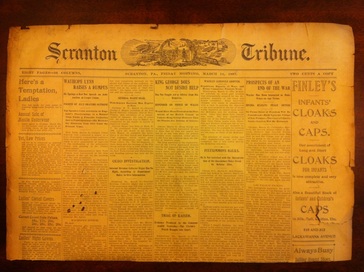
Scranton Tribune 1897 Charles O. Kaiser, Jr.
I hope after a couple of weeks' rest, y'all are rested up for the next 48 Hour Ephemera Challenge!

It's definitely going to be challenge. Take a look at the quick intro video about it: 

Joined us before? Come on back!

Haven't joined us before? Then please do! [What a perfect way to start ~ with a murder.]

Mr. Charles O. Kaiser, Jr  supposedly married Emma P. Then supposedly killed her. [This newspaper article doesn't paint him in a favorable light.]

He had some kind of questionable relationship with this one guy. They definitely had a history.

And then this guy knew this other woman who wasn't exactly honest. And she definitely had a history with this one guy.

And you are definitely going to need to bring your A-Game to this 48 Hour Ephemera Challenge. [Are you good with newspaper research? Then this challenge was made for you.]

Can we find where they came from? Who they were related to? Whatever happened to them? 

Can we find their stories? Can we put these characters ~ these people ~ back into history where they belong? 

In 48 hours?

There's only one way to find out. And good luck! =)

The 'Charles O. Kaiser, Jr. put on trial' challenge is now posted in the 48 Hour Ephemera Challenge Forum!

~Caroline
0 Comments

My GenSoc Meeting

8/2/2012

4 Comments

 
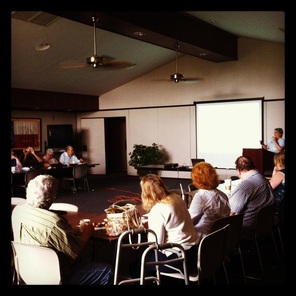
Chaparral Genealogical SocietyChaparral GenSoc Meeting
It was all Amy Coffin's fault. A year ago she mentioned she'd found this awesome society called Chaparral Genealogical Society over in Tomball, Texas.

Now, I had heard of it, but thought to myself, "Geez. Tomball? That's, like, 30 minutes from where I live. But if Amy's willing to drive 60 minutes, it's gotta be good."

And it was.

And it is.

As of our last meeting we're 97 strong and growing. We've got exciting plans that I cannot *wait* to share with you when I'm able.

And? That's where I met the fantastic DAR members, and how I got started in proving my lineage for membership.

But getting back to the society, it's great to know I can go talk genealogy, family history, and history with like-minded folks who treat you just like family.

And this past Saturday was our once-a-month meeting and I thought I'd show you what our meetings look like and what we did.

And show you what I like to do on my way home from said meetings every month because as luck would have it, the road that takes me there and brings me back is the same road that runs in front of one of my favorite places...


All I can say is I'm lucky that Amy shared Chaparral with me. I'm lucky to be a part of such a great group. And? If you live nearby, I encourage you to come check us out.

If you don't, then I encourage you to find a local GenSoc near you. Maybe you'll get lucky too.

~Caroline
4 Comments
Forward>>

    Categories

    All
    48 Hr Ephemera Challenge
    Arizona
    Beginner Series
    Book Reviews
    Conferences
    DAR
    DNA
    Genealogy Fun
    Genealogy On TV
    G+ Genealogy Research Community
    G+ Tech For Genealogy Community
    Heritage Crafts
    History Saturday
    Marriage Records
    Mexico
    New Mexico
    New Records
    Organizing Tips
    Press Releases
    Research Tips
    Shades Of The Departed
    Speaking
    Sunday Scanday
    Tech Tips
    Things You Need To Know This Morning
    What's Up Genealogy? Show

    Archives

    February 2017
    January 2017
    May 2016
    April 2016
    January 2016
    December 2015
    November 2015
    October 2015
    April 2015
    March 2015
    November 2014
    October 2014
    July 2014
    June 2014
    May 2014
    April 2014
    March 2014
    February 2014
    January 2014
    December 2013
    November 2013
    October 2013
    September 2013
    August 2013
    July 2013
    June 2013
    May 2013
    April 2013
    March 2013
    February 2013
    January 2013
    December 2012
    November 2012
    October 2012
    September 2012
    August 2012
    July 2012
    June 2012
    May 2012
    April 2012
    March 2012
    February 2012
    January 2012
    December 2011
    November 2011
    October 2011
    September 2011
    August 2011
    July 2011
    June 2011
    May 2011
    April 2011

About
Blog
​
Connect
Picture
Privacy
Disclosure
Terms of Service
© Copyright For Your Family Story 2016 - All Rights Reserved
Photos from contemplicity, ArchiM, MAURO CATEB, Marco Bellucci, DafneCholet, Outburner, louis konstantinou, laffy4k, foistclub, Phil Monger, epictures ... on & off, fontplaydotcom, Crystl, Patricia Figueira, Andrew Michaels, Daisyree Bakker, jking89, Jan Krömer, clicksense, justinbaeder, Kara Allyson, *sax, Blue Bunny® Ice Cream, mrmanc, mdanys, katmary, euthman, MelGX, Roadside Guitars, donjd2, Victori∀, quinn.anya, law_keven, Aidan Jones, Brocco Lee, lrargerich, Mike Licht, NotionsCapital.com, Nadia Szopinska, Varin Tsai, ClaraDon, Jinx!, the Italian voice, GirlReporter, Peter, mrmanc, Navin75, SantaRosa OLD SKOOL, Rodrigo_Soldon, rharrison, 04deveni, Flashy Soup Can, lizzelizzel, ericmay, flossyflotsam, SMercury98, Tambako the Jaguar, trint, themaum, Robert S. Donovan, Ian Sane, Keith Williamson, owlpacino, joshparent, ellenm1, leppre, ivanpw, buba69, bastique, Mike Licht, NotionsCapital.com, jpockele, Robert Couse-Baker, aesop