
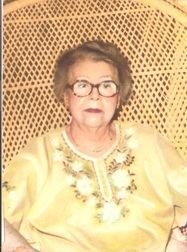
 My Gran. My Gran.
Here's how I'm gonna use OneNote to keep track of my wayward and wily ancestors when they're being a pain in my patooty. The background on the story and the actual research for my Gran that I refer to in my video are on my companion blog,Family Stories. [You know. In case you care.*shrugs*]
And the freebie I mention in my video? Download below. [If it doesn't work, let me know in comments or contact me & I can send you one.] [You didn't realize you were getting so much, did you?] How do you do your research plans? [Let me know in comments.] ~Caroline ***Update: Due to popular demand, I have now made a convenient page for the Freebie OneNote Template (as well as some other versions).***
18 Comments
5/15/2012 12:00:00 am
Carolyn, Love using One Note and really like the way you are using it for your research plans. Definitely lifting this idea! Nice job.
Caroline M. Pointer
5/15/2012 01:19:53 am
Thanks Valerie! I'm glad you liked it. Lift all you want.
Mamie Burton
5/16/2012 06:49:41 am
Ditto to Valerie's remarks. I really like the research plan that was provided. This will help me greatly in my organization of my family search and keep me on track. I'm lifting too. Thanks Caroline for sharing! 5/15/2012 12:24:11 am
Caroline great tutorial. I been using one note for my research for many years, I learned about a few features I was not aware of, thanks!
Caroline M. Pointer
5/15/2012 01:21:11 am
Lynn, I'm glad I could help. There's some more functionality to it that's relevant to researchers. Maybe I'll do a quick follow up...
Tanya Honey
5/16/2012 01:26:07 am
Caroline M. Pointer
5/17/2012 03:19:55 am
Tanya's comment somehow didn't publish, but I still got it. So here it is:
Caroline M. Pointer
5/17/2012 03:22:03 am
Mamie, 5/17/2012 05:21:47 am
Great tutorial! I'm always on the lookout for better ways to organize my research. Plus, I'm lazy--I need to make it easier to keep up with, and I like being able to access it through my Android (there's an app for Android, too :). I'll give One Note a try! Thanks for providing your research plan worksheet. Downloading it now.
Caroline M. Pointer
5/21/2012 09:15:10 am
Thanks Catherine! I'm glad I could be of help. I'll be doing a review of the OneNote app so stay tuned. I think OneNote is very powerful especially for researchers like us. 5/21/2012 07:56:53 am
Caroline, your style of presentation is so clear and crisp! I've watched the two FTM videos and this first OneNote video, and I am feeling so much more comfortable with both the tech and the research-organizing strategies in OneNote, and the sync capabilities, not to mention the sources you mention on Video 2 for FTM. I have taken notes as I watched, and so far I think I understand everything. So for "new genealogists" or beginners like me, this is perfect. On to the second OneNote! Thanks again!
Caroline M. Pointer
5/21/2012 09:18:07 am
Marianne, 5/22/2012 05:58:30 am
Caroline,
Caroline Pointer
5/22/2012 09:22:19 am
Mariann,
Heather Weatherholt
7/27/2021 02:29:59 pm
Tried to download the template, but got 404 file not found error.
Caroline
8/2/2021 08:35:18 am
Hi Heather,
Caroline
8/2/2021 08:45:36 am
Hi, Heather, Leave a Reply. |
|
© Copyright For Your Family Story 2016 - All Rights Reserved
|