
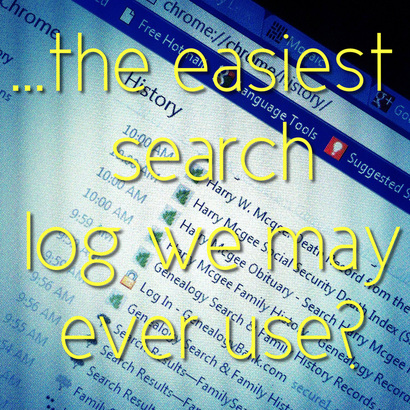
 Chrome Browser History Log photo edited in Picfx & Photon on iPhone. Chrome Browser History Log photo edited in Picfx & Photon on iPhone. Okay. I did a sufficient amount of a lead-in to this blog post yesterday. But to bring it all together, let me just say that it seems that many of us have already adapted some kind of system of recording where we have researched [as opposed to 'searched' and for clarification on that, look at yesterday's post] in some pretty nifty ways like employing MS Office OneNote or Evernote. And we may have already come up with a system within the genealogy database software that we currently use. And we're happy with it. From the comments yesterday, though, I can tell that many of us are not recording our online searching ~ positives or negatives ~ in a log or form. Because if we have a positive find and have recorded the source information then recording it into a log would be redundant. And the negative searches are just not that important because the records or information availability changes rapidly online and we're in the search phase, not the research phase. [I'm generalizing and summarizing from the comments yesterday and if you don't agree, that's great. Let us know in comments below. This kind of discussion is a good and necessary part of identifying online workflow processes. =) ] And this is where I might upset some New Agers. I would politely disagree with the thinking on negative results. They are important. It's just the thought of recording all the negative results down that we may come across in a just 3-hour period alone of online searching on a log or form completely and utterly horrifies us. The search that comes kind of naturally [at least for me] to us New Age Genealogists who tend to do some free and uninhibited preliminary searching online can be a fast and furious kind of search, especially if it's a 3-day holiday-weekend-research-bender-and-we're-not-stopping-until-we-find-the-answer-or-narrow-down-where-the-answer-might-be-offline. And come Sunday evening, we're bleary-eyed from too much searching, junk food, and caffeinated products [Is it possible to have too much searching, junk food, and caffeinated products while looking for our ancestors?!?], and we are tempted to jot some notes down quickly before shutting the laptop closed and passing out without marking down where we went online that weekend in a nice little log or form. 'Cause the thought of logging all that down in a form is just not possible at any point during the search phase. During the search phase, we're ripping through sites, chasing down leads, and basically we're in an online search groove, baby. And afterwards we've no clue as to exactly where we've been. We know what we found. We've a system for that. But we don't have a good system for the negative results that we might need to revisit later for a wayward brother to our great grandmother who we had no clue even existed [the brother, not the great-grandmother]. So. What to do? Some sites like Ancestry.com keep a recent history of your searching on their site. And the links to those are in the bottom right hand corner of your Ancestry.com Home Page. [Very nice.] But other sites don't have search histories available. At least, I couldn't find them. But you can use your Browser History. You know. That Big Brother kinda feature that no one likes and people tend to clean out on a regular basis for various reasons? The Browser History records every single unique URL address we visited in link form as well as the date we visited each URL in the order that we visited them. [Ohmigosh, right?] And each of the 3 main browsers has a history with different features. For example, Firefox allows you to tag each line item or URL visit with tags. And Internet Explorer 9 [IE9] allows you to have the Browser History in a sidebar so that you can watch it record where you go as you go. [Which I think looks really cool.] And I tested Ancestry.com, GenealogyBank.com, and FamilySearch.org on all 3 browsers to see exactly how the recordings look. I was pleased with how it recorded Ancestry.com's visits; extremely pleased with how it recorded GenealogyBank.com's visits; and a wee disappointed with how FamilySearch.org's visits were recorded. Why the disappointment? Because it didn't record who I was searching for on FamilySearch.org like it did for the other 2 sites. Check out the screenshot below to see what I mean. [It's the IE9 one because I like it the best for some reason. Click for a larger image.] 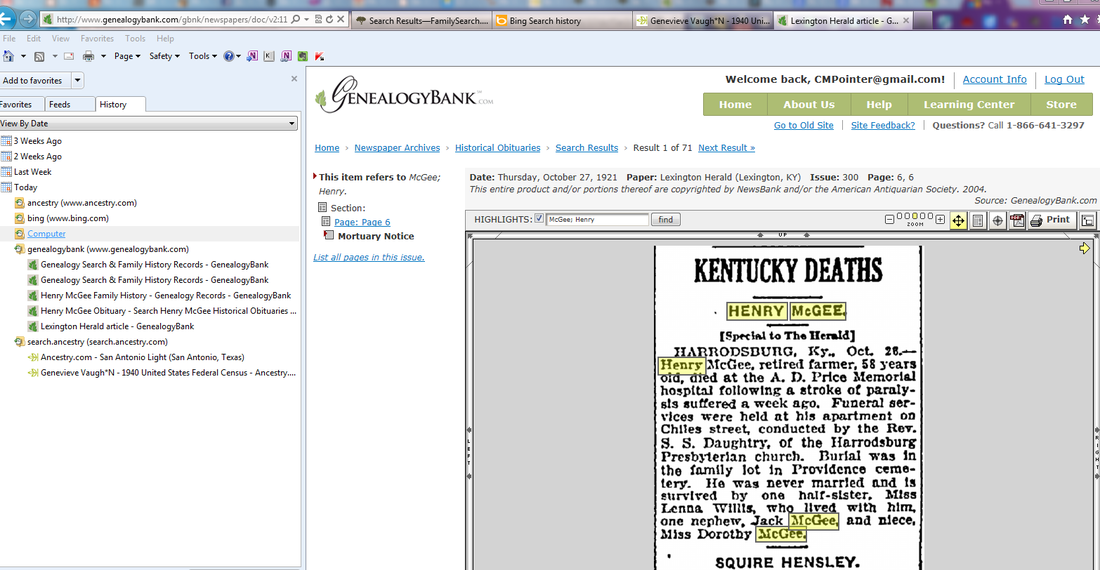 Screenshot of Browser History in Sidebar view in IE 9. Now. This is a revelation. I use my Browser History all the time in this manner subconsciously in all kinds of research [not just genealogy and family history search/research], but I never thought about capturing the info in a screen capture, placing it into my note-taking system, and annotating it with some info, like, 'this is (N)' for negative results in a red font color, or something like that. You know, recording the negatives? And for that matter, recording everywhere I had been. I just woke up yesterday morning and had this Ah-ha! kind of moment. [What can I say? Sometimes the ancestors wake me up with their stories and sometimes it's the Research Fairy.]
And the more I got to thinking about it, it's kind of revealing to see how I went about my free and uninhibited online searching by looking in my browser's history log. [Can you say, "Patterns?"] So. Tomorrow I'll have a FREE and quick video tutorial showing you the process that I've created to record these Search Logs in OneNote, Evernote, and FTM2012, and how I would annotate them quickly to suit needs. [At least my needs.] 'Cause, folks, our computers, and especially our browsers, have been recording our Search Logs all along for us... ...making it the easiest Search Log we may ever use. [Until something even better comes along. Like, you know, tomorrow.] ***UPDATE: Here's the video, "How to easily record a log of your online searches". Enjoy! =) *** ~Caroline
34 Comments
Caroline M. Pointer
9/11/2012 01:09:44 pm
Oh no. No hero here, Stephanie. Just someone always looking for a more efficient way of doing things and looking for ways to make my tech work for me ~ not the other way around. =)
Cindy
9/11/2012 12:10:17 pm
Once again you do not disappoint. 👑 off to you!
Caroline M. Pointer
9/11/2012 01:10:54 pm
From one tiara wearer to another, I thank you!! LOL. 9/11/2012 12:26:37 pm
Very nice! Creative and well thought out - kudos to you and looking forward to your video tutorial. I also wrote about Research logs and plans on today's Olive Tree blog post, bouncing off of Kim Cotton's post which I spotted when you shared it on Facebook. Great stuff! I can so relate to the I"m-on-a-roll-and-not-stopping-til-I-find-it-all weekend binge type of online searching
Caroline M. Pointer
9/11/2012 01:12:26 pm
Lorine,
Cohen Swiney
9/11/2012 12:35:21 pm
Terrific !!!
Caroline M. Pointer
9/11/2012 01:13:12 pm
Thanks, Cohen! Glad you found it useful! 9/11/2012 12:56:20 pm
Thanks for this Caroline. After I read your post, I spent some time testing this with some other databases that I use frequently such as California Newspaper Archive, NYC Death Records, and SFgenealogy.com as well as a few others. At least half of them stored the search parameter(s) in the url and therefore were displayable in the Browser History (I use Chrome). Like familysearch.org, others did not.
Caroline M. Pointer
9/11/2012 01:15:11 pm
Thanks Kenneth! Yeah, it's not perfect, but I found some tricks and perhaps a workaround for those secretive URLs that I'll show in my tutorial tomorrow. 9/11/2012 01:24:56 pm
Smarty pants! This is one of those moments I say why didn't I think of that? And now that I think back I have used browser history to trace back my research steps, just never thought to capture it in a screenshot, looking forward to the tutorial. 9/11/2012 02:14:02 pm
Um, BRILLIANT. That's not an overstatement...this is absolutely brilliant. And this can be used in so many awesome ways. 9/11/2012 02:20:45 pm
Great idea Caroline! You are officially Queen of the Problem Solvers. I forgot I even HAD a history ... and like Kenneth, I also use Chrome and I love that I can see my search parameters (on most sites). More importantly, this will help answer that age-old question ... "Which site said something about that ... ?" 9/11/2012 11:33:27 pm
Fantastic, I'm putting a note on my monitor to remind me to grab the history when "the hunt" is finished (for the day anyway) 9/12/2012 12:21:02 am
What a brilliant idea!!! You know it's brilliant because as soon as people hear it, it's SO obvious and yet most of us, OK ME, hadn't thought of it!! 9/12/2012 12:25:35 am
I wished I had thought of that! Awesome job and I will be trying that soon.
Becky Higgins
9/12/2012 01:09:43 am
Why have I not thought of this before?! Great idea. Caroline. Can't wait for the video:-) 9/12/2012 01:31:02 am
You are so right! Exactly right. I do not record my negative searches, except maybe ones that really disappoint me and make me indignant. (Like, that info should be there! And it isn't!) And then there are the whim searches that make me feel, like, well, that search was stupid. But all the chickens come back to roost when I do a negative search and say to myself, Wait, I've tried this SAME search before...and that's when I feel Halfheimer's has caught me. Not good. 9/12/2012 05:41:03 am
As a younger genealogist, I'm really looking for ways to learn the old techniques and use new tech. I've been using One Note for the last couple of years and I love it! 9/12/2012 12:31:35 pm
OK, this is one of those DUH moments for me. Glad you thought of it and shared because I don't think my lightbulb would ever have come on! 9/12/2012 12:42:04 pm
Caroline, 9/12/2012 12:59:51 pm
Greetings Caroline, 5/2/2013 12:52:51 am
Life is amazing ,I have been working on an Evernote Check List, with check boxes, and I think I should try to update that check list to include the website searches..
John Sparrow
5/12/2014 10:10:23 am
I agree wholeheartedly that negative searches must be recorded. 1. More records may be added that contains the pearl you need. 2. You may subtly alter the search terms the next time you search.and can get different results.
Regina
8/23/2015 01:25:38 am
Love the demo. Very easy to follow and to implament
CAROLINE M POINTER
9/14/2015 06:51:05 am
Thanks Regina! I'm glad you enjoyed it!
Lorraine howard
8/23/2015 01:30:27 am
Dying to watch the video but on a train and don't think other passengers will appreciate it as much as I will. Will have to wait about 6 hours. ☺️ Thank you
Christy
8/23/2015 06:03:18 am
Genius! My love of genealogy lets me hyper-focus (lesser known side effect of ADD, actually) on the search and stopping to enter things in a log destroys that and totally ruins my momentum. This solution will be perfect for me, I think, because I can just roll on until I'm done, then run this to clean everything up at the end. I'm planning to go pro and this is going to be a life-saver. Thank you!!
CAROLINE M POINTER
9/14/2015 06:49:49 am
Hi Christy, Leave a Reply. |

|
© Copyright For Your Family Story 2016 - All Rights Reserved
|